Passkey Authentication Ceremony
This is the third post in a multi-part series covering passkeys (or WebAuthn). Each post builds on previous posts in the series, so catch up if needed before continuing.
Table of Contents
- Introduction
- The Registration Ceremony
- The Authentication Ceremony (current)
- FIDO Metadata
- The Packed Attestation
- Implementing a Virtual Authenticator
Note: will be updated as more posts are completed
The authentication ceremony is the process by which an authenticator is used to verify a user's identity. This is done by utilizing the key pair stored on the authenticator for the specific website.
Note: All specifications linked throughout this document are up to date at time of writing, remember to check for updated specifications before implementing.
Before we begin, a few terms must be defined:
Authenticator: The device providing credentials upon request. This will likely be a password management tool, like 1Password, or a physical authenticator, like a Yubikey.Relying Party: The service providing the passkey creation options and storing the public key from the authenticator. This service must have a unique id that identifies it to the authenticator.Session Store: A store holding values which are attached to a device (usually through a cookie). The store must properly secure the values to prevent them from being tampered with.
The below diagram provides a general flow of the authentication ceremony. The grey box along the Relying Party line indicates the need for a singular value to be persisted into a session and for how long it must be persisted.
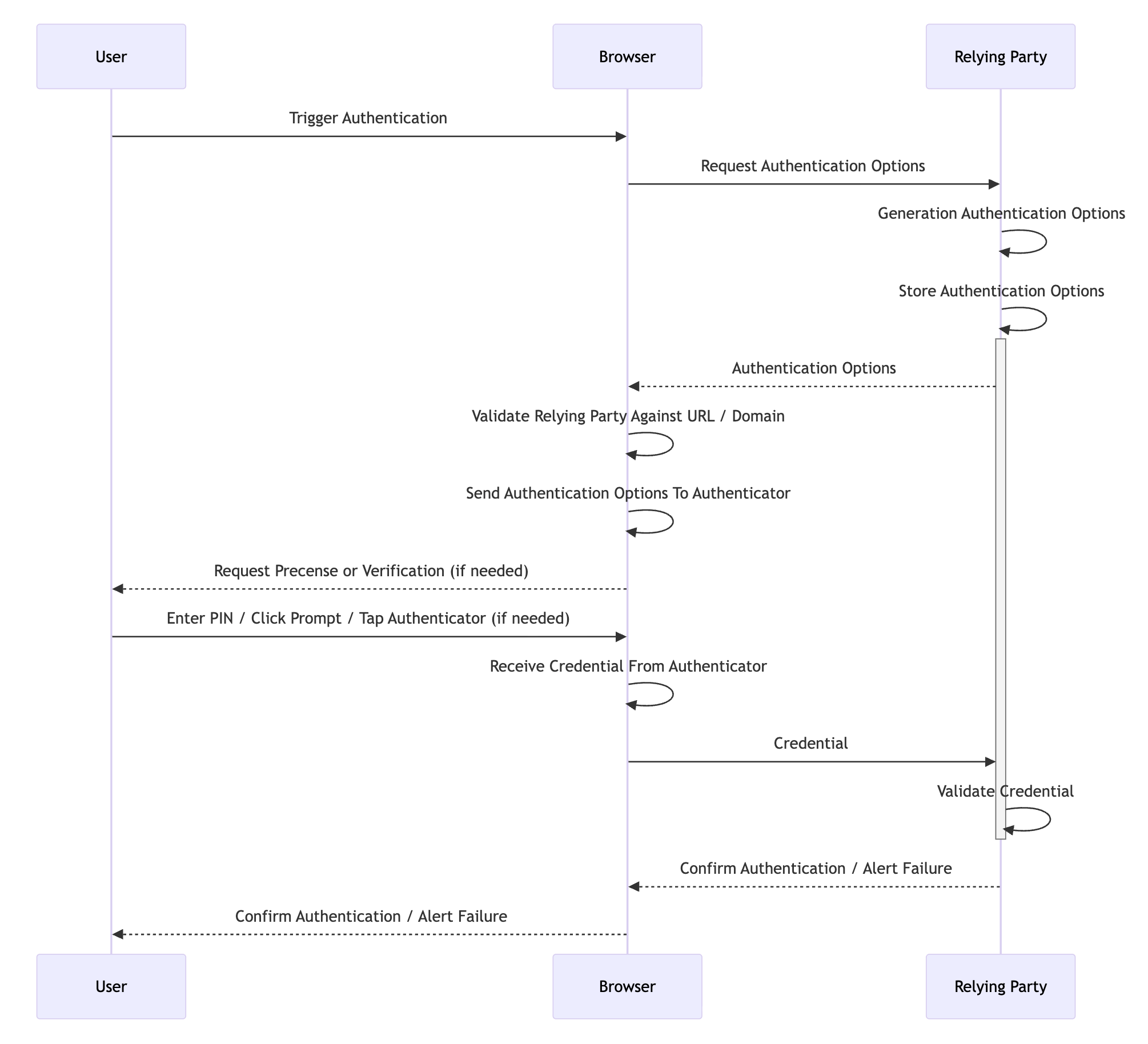
The ceremony has a few distinct phases: the trigger, generation of the authentication options, retrieval of the credential, and validation of the credential. The options must be safely stored by the Relying Party from the start of the process to the end. However stored, the options must be free from tampering to provide the security guarantees that WebAuthn promises. Storage is usually done via a backend system like Redis where the options expire after a short timeout, usually a few minutes at most.
For our purposes, we will use the standard use case for WebAuthn. The user will be visiting a website, the Relying Party will be the website itself, and the authenticator will be a hardware authenticator. The trigger is easy enough, the user visits a sign-in page and clicks a login with passkey button. The site may request a username or email address before the button is activated, but this is not necessary UNLESS the site is not using resident (or discoverable) credentials, in which case it is necessary.
The generation of the authentication options comes next. Here the Relying Party has numerous options that can be supplied to the authenticator in the form of a JSON payload. We discuss what each field does after the example payload.
{
  "allowCredentials": [{
    "id": "string",
    "type": "public-key",
    "transports": ["ble | hybrid | internal | nfc | usb"]
  }],
  "challenge": "string",
  "extensions": {},
  "hints": ["security-key | hybrid | client-device"],
  "rpId": "string",
  "timeout": "number",
  "userVerification": "discouraged | preferred (default) | required"
}
allowCredentials: the list of credentials registered for the user attempting authentication (required for non resident credentials).challenge: the string to be stored in and hashed with theclientDataJSONthen signed. This should be random each time and sufficiently long to prevent replay attacks.extensions: several extensions are available in the WebAuthn specification. Most are focused on creation but a few likeappid,largeBlob, andprf(among others) are used during authentication as wellhints: these allow Relying Parties to control the browser authentication experience to an extent, potentially skipping platform options like macOS's Touch ID for example.rpId: the domain of the Relying Party. Note that this must be the domain strictly:example.comnothttps://example.com.timeout: a hint (in milliseconds) for the maximum amount of time that authentication can take.userVerification: controls whether the authenticator should request the user verify themselves (with a PIN or fingerprint), with theUVflag in the response confirming the outcome. This is different from user presenceUPwhich simply means the user indicated they were present during authentication.
Once the options are generated, they are provided to the authenticator via the standard browser API navigator.credentials.get({options}). The browser must validate that the site in question is authorized to use the rpId before it can ask the authenticator to return a credential.
That validation process includes two checks. For websites, the rpId must be a valid domain. The current website must either be a subdomain of the rpId (for example, rpId is example.com and current website is sub.example.com) or rpId must expose a /.well-known/webauthn endpoint listing the current website as an officially supported origin. This is the step that gives WebAuthn its famed phishing resistance.
Should validation succeed, the credential is returned to the relying party. The relying party must now confirm the credential conforms to the options provided, and if it does not, validation errors must be returned to the user alerting them that their authenticator is not registered for the site in question or that the ceremony failed for some other reason. An example credential is provided, then a discussion of the fields and validations needed on each follows.
{
  "authenticatorAttachment": "cross-platform | platform",
  "id": "string",
  "rawId": "string",
  "response": {
    "clientDataJSON": "string",
    "authenticatorData": "string",
    "signature": "string",
    "userHandle": "string"
  },
  "type": "public-key",
  "clientExtensionResults": {}
}
authenticatorAttachment: indicates whether the authenticator that produced this credential is aplatformauthenticator (built into the device) or across-platformauthenticator (like a USB security key).idandrawId: the credential id assigned during registration. The Relying Party must use this to look up the stored public key and associated metadata for the credential.response.clientDataJSON: a simple JSON response that provides the data the authenticator received back to the Relying Party. The Relying Party must validate that thetypeiswebauthn.get, thechallengematches the one provided in the authentication options, and theoriginmatches the expected origin.
{
  "type": "webauthn.get",
  "challenge": "9f3k-xYY1c5RZSi5q5GKhA",
  "origin": "https://example.com",
  "crossOrigin": false
}
response.authenticatorData: a binary payload containing metadata about the assertion. This includes the RP ID hash, flags, and the signature counter. The flags are particularly important during validation:UP(User Present): must be set to confirm the user was physically present during the ceremony. This is almost always required.UV(User Verified): confirms the user was verified via a PIN, biometric, or other method. This must be checked against theuserVerificationoption provided in the authentication options. IfuserVerificationwas set torequired, this flag must be set.BE(Backup Eligible): indicates whether the credential is eligible for backup (e.g., synced across devices).BS(Backup State): indicates whether the credential is currently backed up.
response.signature: the signature produced by the authenticator. This is the core of the authentication ceremony. Verification is performed by the Relying Party as follows:- The
clientDataJSONis hashed using SHA-256 to produce theclientDataHash. - The raw
authenticatorDatabytes are concatenated with theclientDataHash. - The resulting value is verified against the
signatureusing the public key stored during registration and the algorithm specified at that time.
If verification fails, the credential must be rejected.
- The
response.userHandle: theuser.idthat was provided by the Relying Party during registration. For discoverable credential flows where no username is provided upfront, this is how the Relying Party identifies which user is authenticating. The Relying Party must use theuserHandleto look up the user and confirm the credential belongs to them.type: at the time of writing,public-keyis the only valid value.clientExtensionResults: if extensions were requested, results will be provided here. For example, if theprfextension was requested, the derived key material will be returned in this object. If theappidextension was used for U2F backward compatibility, a boolean will be returned indicating whether theappidwas used instead of therpId.
After the credential has been validated, the Relying Party should also check the signature counter. The authenticatorData contains a signCount value that should be greater than the value stored from the previous authentication (or registration). If the counter has not incremented (or has decreased), it may indicate a cloned authenticator. Not all authenticators support signature counters (some always return 0), so the Relying Party must account for this case as well.
Note: The signature counter is a best-effort defense against cloning. If the stored counter and the returned counter are both
0, the authenticator does not support the counter and the check should be skipped.
Once the authentication succeeds, fails, or times out, the Relying Party should destroy the authentication options, and that's it! The ceremony is complete. Discussing FIDO metadata is next.
Want to try out the authentication ceremony yourself? Give the developer tools from Yubico a try.